Alfa2Go
GET - In Google Play
GET - In Google Play
Enable AutoPay to make automatic payments from your bank account or payment card when your policy premium is due. To help ensure your upcoming payment is processed automatically, enroll in AutoPay at least 3 days before the policy due date. Each eligible policy must be enrolled separately.
 | Log in to your MyAlfa accountThe login icon is located in the top right-hand corner of most pages across Alfa’s website. |

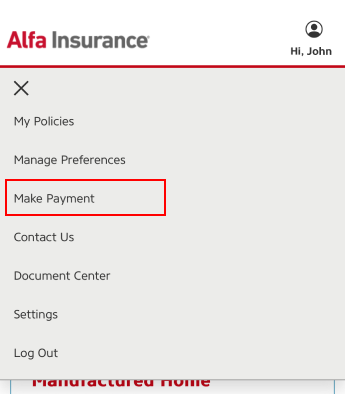
 | Select “Make Payment”Select “Make Payment” from the account menu. You will be redirected to our payment site where you can manage your billing information. |
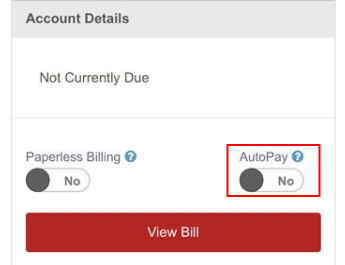
 | Toggle the AutoPay switch to “Yes”If your policy is eligible for AutoPay, there will be a toggle switch. Switch the toggle to “Yes” to opt-in for each desired policy. |
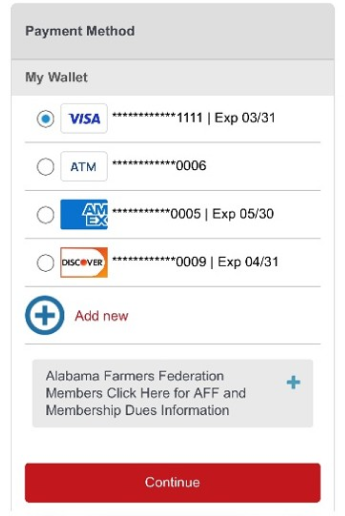
 | Select a payment methodSelect an existing payment method or add a new bank account or card. This payment method will be used for automatic premium payments. Then select “Continue.” |
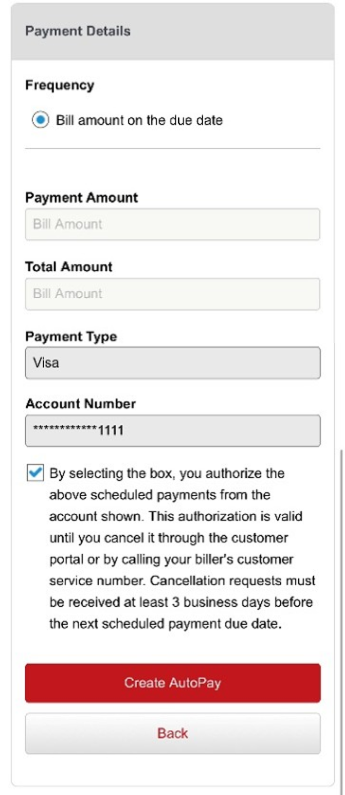
 | Confirm your AutoPay settingsReview your information and select the checkbox to authorize scheduled payments. Then select “Create AutoPay” to complete enrollment for the selected policy. |